This blog post covers the Prep data for AI, specifically the verified answers and where the metadata is stored in Power BI.
Prep data for AI
It enables the semantic model for AI ready. It means it helps to enrich the semantic model with more business context which will be used by the Gen AI agents for the context and help provide accurate or trustworthy response.
It has 3 main sections,
- Simplify the data schema – it helps Gen AI LLM to focus on only the important tables for the better context and AI insights. Your semantic model may have multiple tables and some of them are core dimension and fact tables and some of them are supporting tables or tables with data to support the report visuals to match the business requirements. From an AI insights through Copilot perspective, you may need only core tables.
- Verified Answers – Enables to mark the visuals which helpful for Copilot to identify and use for the response. Discussed more in below section.
- Add AI instructions – This is section for free text where you can provide more business context of the model. Semantic model objects typically stores more technical information like tables, columns and measures. If you need to business context like setting up a details of what is the calendar period for an organization or holiday period etc can be defined in AI instructions.
Verified Answers
When user use the Copilot for conversational insights, everyone would be keen on the accuracy of the response. The accuracy of the response is based on how well the Copilot understand the semantic model technical and business context. We need to provide those details for Copilot to understand and provide right results.
Verified Answers enables to provide more accurate responses. Verified answers can be defined at a report visual level. Visual holds the verified answer with the context of what visual type, dimensions, measures used on the visual and any filter conditions. Those verified answers help get improved consistency, improve the copilot accuracy.
Verified Answers can be set in Power BI Desktop or Power BI Service report. Go through the Microsoft document for more information – https://learn.microsoft.com/en-us/power-bi/create-reports/copilot-prepare-data-ai-verified-answers
Metadata of Verified Answers
Verified Answers are stored at a semantic model, but we can not query the semantic model using DMVs or info functions to get the verified answers. It is stored on the file system which you can easily check under PBIP version of the semantic model. You can see a folder called “Verified Answer”” under the. Semantic Model folder. Verified Answer folder can contain folder and files. You see each Verified answer create a folder and files.
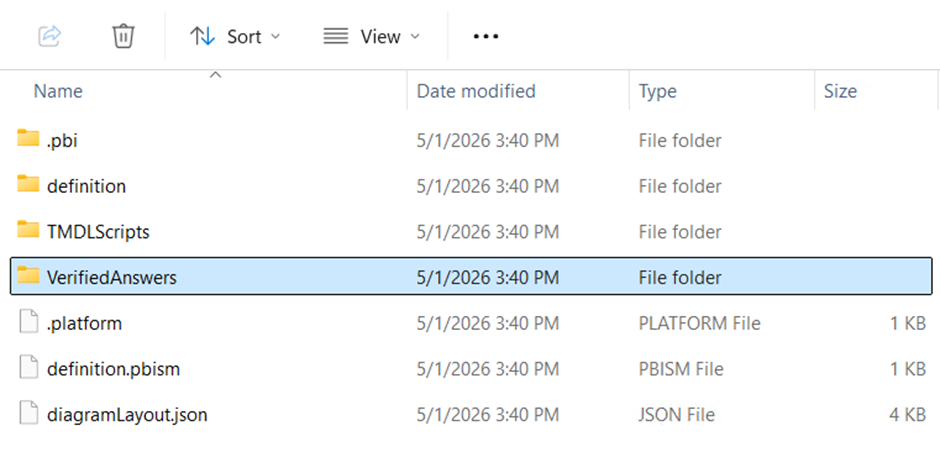
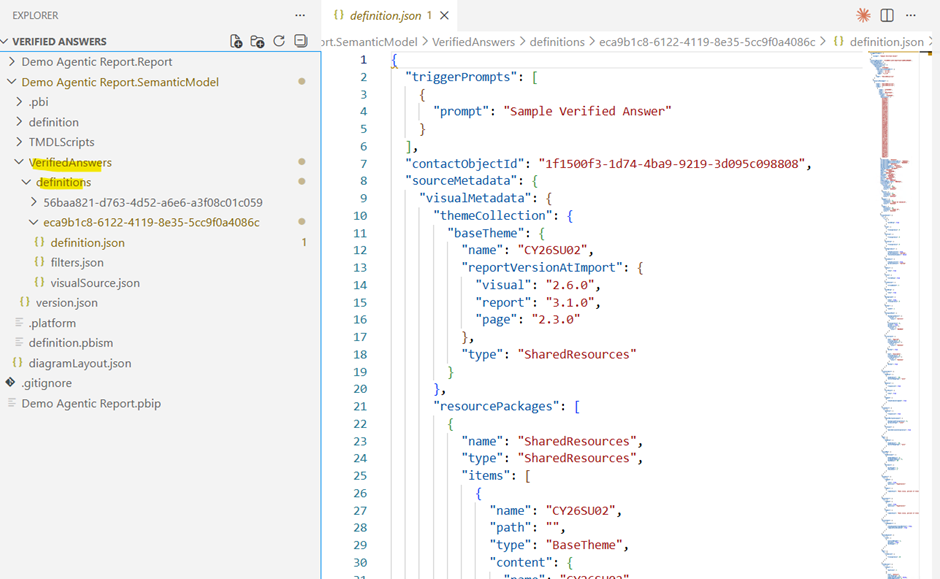
Structure of Verified Answer Metadata
Each Verified Answer lives in its own folder (identified by a unique GUID) and contains three key files:
definition.json
The main configuration file. It holds:
• Trigger prompts — the natural language question(s) that activate this answer
• Contact ID — the person or service responsible for maintaining it
• Theme metadata — visual styling applied to the answer (colors, fonts, etc.)
filters.json
Defines the data filters that are pre-applied to the visual. These can be:
• Categorical — filter by a specific column value
• Advanced — filter based on aggregated measures
Filters can be locked, meaning end users cannot modify them — ensuring the answer always reflects a controlled slice of data.
visualSource.json
Describes the visual that will be rendered, including:
• Visual type (bar chart, donut chart, table, etc.)
• Fields mapped to axes or values
• Default sort order
Conclusion
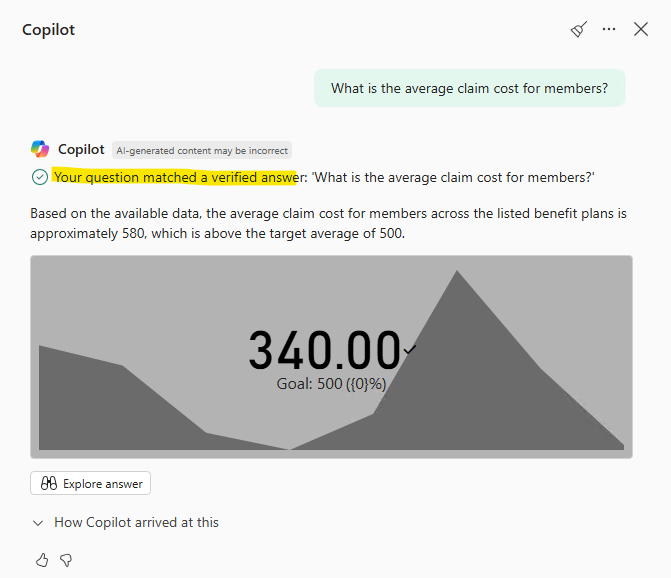
As the data is stored in semantic mode and able to see under PBIP folder semantic model, we can customize the information programmatically which will help copilot to get more context and help provide accurate and verified results as like below.

Leave a Reply