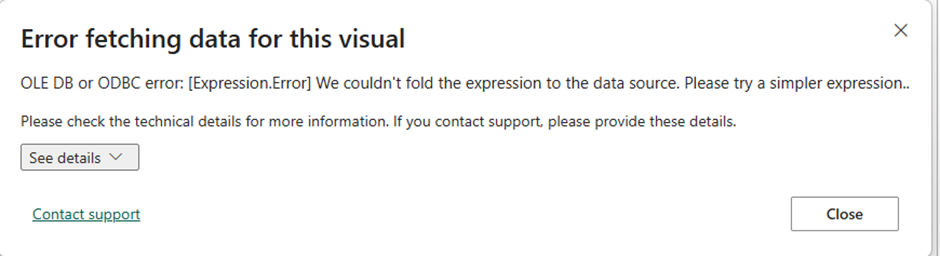
Recently, I ran into this error recently when using Time Intelligence functions in my DAX measures
Error – OLE DB or ODBC error: [Expression.Error] We couldn’t fold the expression to the data source. Please try a simpler expression.
Please check the technical details for more information. If you contect support, please provide these details.
Setup & Source
We had a simple model with Databricks as a source where Fact table was in Direct Query since we have more than billion rows and one date dimensions which is in dual (Import + Direct Query). We had a simple measure called
PY Sales = CALCULATE([Sales],SAMEPERIODLASTYEAR(‘Date’[Date’)
Error Investigation
The error says we could not fold the expression to the data source. We may think that this simple Time Intelligence function is supported by the data source because the table is connected as a Direct Query.
Databricks supports time intelligence functions, so the error is due to another reason.
Step 1 – Check the Power Query layer for any additional transformations which are not supported by Databricks. There are no such transformations. We see the “View Native Query” option enabled, which is a way of checking whether the query folded or not. Everything is good in Power Query layer.
Step 2 – Started checking the TMDL version of the table and found that…
Below is the script of the table and column.
‘column Date
            dataType: dateTime
            isKey
            formatString: Long Date
            sourceProviderType: nvarchar(max)
            lineageTag: 29b24f77-8e38-4c22-993e-82d8db46ebf9
            summarizeBy: none
            sourceColumn: Date

            changedProperty = DataType

            annotation SummarizationSetBy = Automatic

            annotation UnderlyingDateTimeDataType = Date
Checked the data type of Date column in Power Query layer it was Text so developer has modified the data type in model level. That has been reflected in TMDL script – “ChangedProperty”=DataType
If the developer updates the data type in PQ layer then they could have seen the issue of not supporting the transformation.
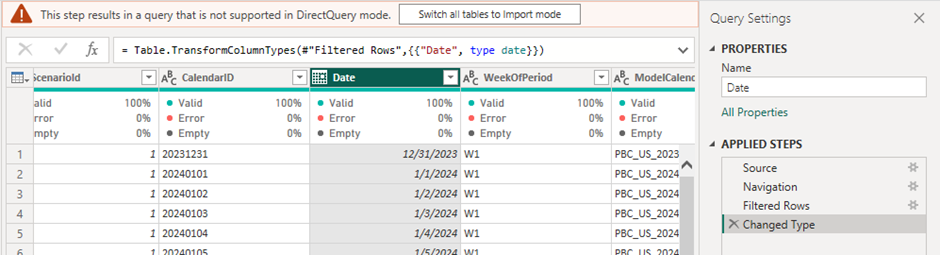
“The data type change happed on model level will not track under PQ layer. Because of that we got an error. “
Fix
We pushed the transformation to backend so the time intelligence measure started working
Consideration
Check if you see below property in the table column in TMDL. It means it is data type change happened after PQ layer.
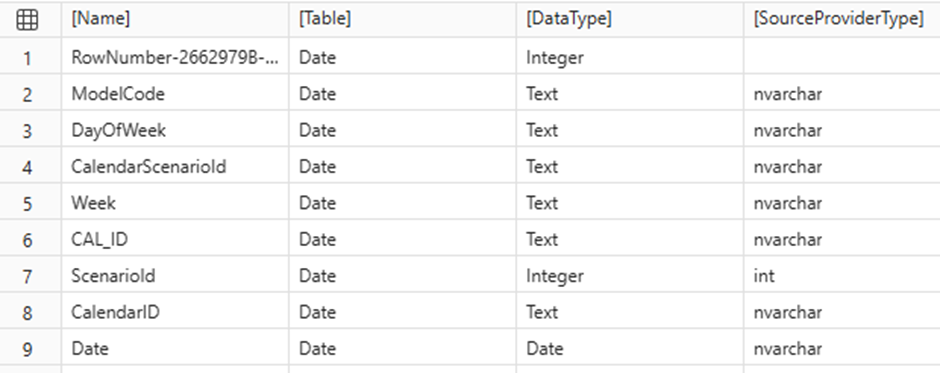
changedProperty = DataTypeRun the below DAX script in DAX Query View and it will show if any change in data type compared to source and in Power BI layer.
EVALUATE
    SUMMARIZE(
        INFO.VIEW.COLUMNS(),
        [Name],
        [Table],
        [DataType],
        [SourceProviderType]
    )

EVALUATE
    FILTER(
        ADDCOLUMNS(
            SUMMARIZE(
                FILTER(
                    INFO.VIEW.COLUMNS(),
                    NOT CONTAINSSTRING(
                        [Name],
                        "RowNumber-"
                    )
                ),
                [Name],
                [Table],
                [DataType],
                [SourceProviderType]
            ),
            "IsMatch", VAR PBIType = [DataType]
            VAR SourceType = [SourceProviderType]
            RETURN
                SWITCH(
                    TRUE(),
                    PBIType = "Text" && SourceType = "nvarchar", TRUE,
                    PBIType = "Integer" && SourceType = "int", TRUE,
                    PBIType = "Number" && SourceType = "double", TRUE,
                    PBIType = "Number" && SourceType = "decimal", TRUE,
                    PBIType = "Date" && SourceType = "date", TRUE,
                    PBIType = "True/False" && SourceType = "bit", TRUE,
                    PBIType = "Integer" && SourceType = "", TRUE,
                    PBIType = "Text" && SourceType = "", TRUE,
                    PBIType = "Integer" && SourceType = "bigint", TRUE,
                    FALSE
                )
        ),
        [IsMatch] = FALSE()
    )
Sample response

Leave a Reply